Screenshot the exact frame.
Not the one before it.
Pausing and using the snipping tool gives you a blurry, half-scaled crop of your screen. Frame Grabber reads the frame straight off the video at its native resolution and writes it to disk in one keypress | PNG, JPG or WebP, already named.
Works in Chrome, Edge, Brave and Firefox. No sign-up. No uploads. No tracking.
What it does
Everything a frame grab should have been all along
Six things the snipping tool will never do for you.
The real pixels, not your screen
The frame is read from the video element itself, so a 4K video gives you a 4K still even in a small window. No scaling, no compression from a screen capture, no browser chrome bleeding into the edges.
Pick your format
Lossless PNG, small JPG, or WebP in between; switch from the toolbar without opening settings.
Every pixel kept. The safest choice for editing, and the default.
One keypress
Shift + S while the page is focused, or a browser-wide shortcut that fires even when it is not.
Straight into Downloads
New in 1.2.0: no more forced subfolder. Frames land in your Downloads folder. Want a different place? Name a subfolder, or turn on the save dialog and browse anywhere on disk.
Nothing leaves your machine
No account, no analytics, no remote code, and not a single network request. The capture goes from the video element to your disk and stops there.
It knows what it just saved
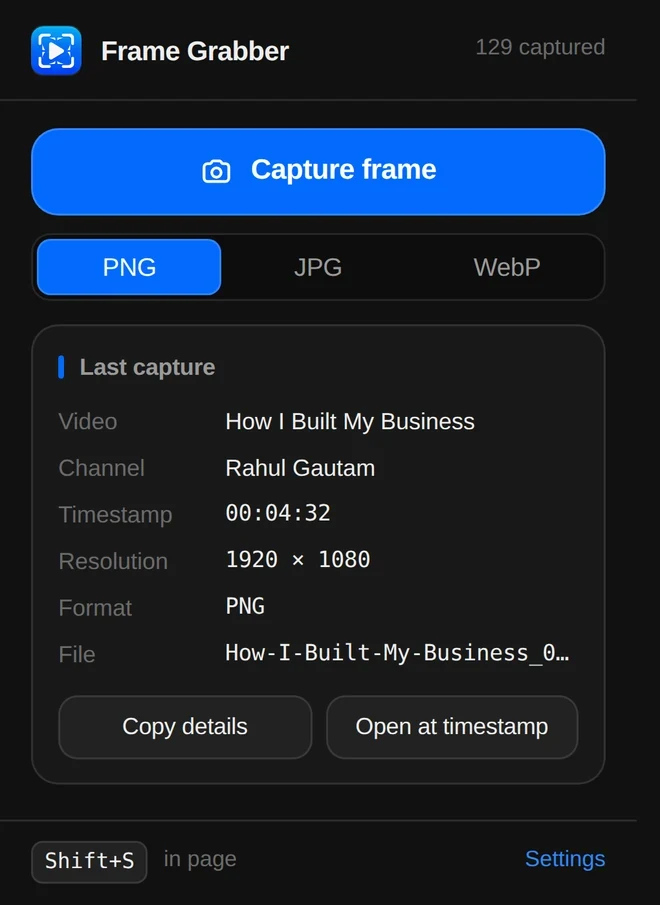
The toolbar popup keeps the last capture; video, channel, timestamp, resolution, format and filename; with a button that reopens the video at that exact second.
Named before it hits the disk
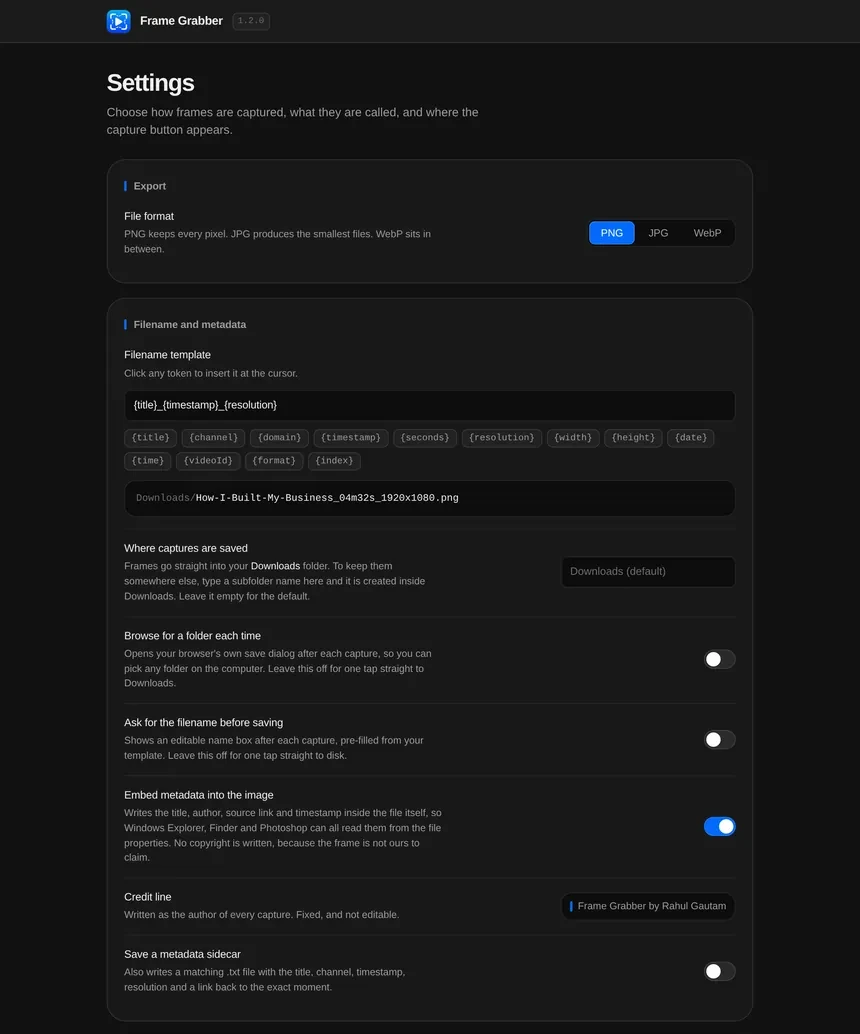
Thirteen tokens; title, channel, timestamp, resolution, date, video id and more; build the filename automatically.
Add a / to the template and it files them into folders as well.
How it works
Three steps, then it is muscle memory
Add it and forget it
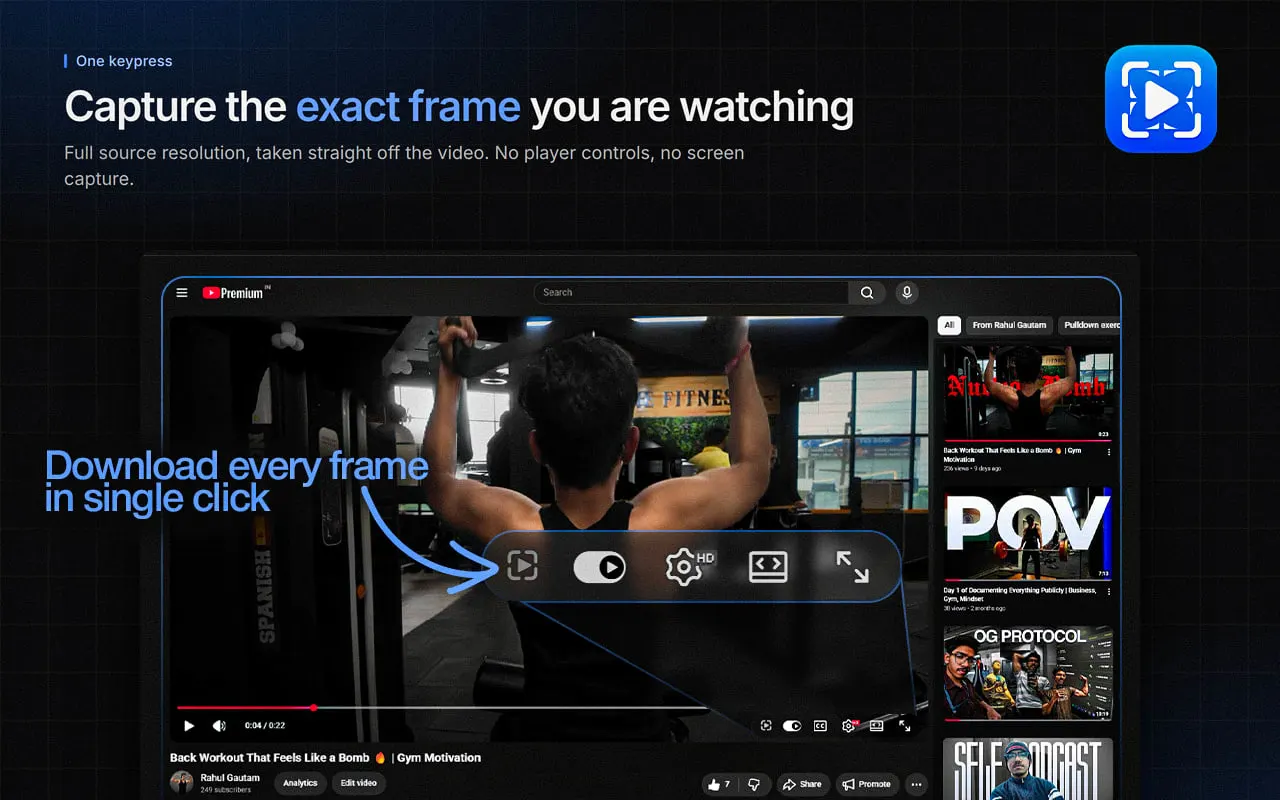
One click from the Web Store. A camera button appears in the YouTube player, right before the settings gear, and a floating button on every other site you enable.
Land on the frame
Scrub to the moment you want. Use , and . on YouTube to step a single frame at a time. Frame Grabber can pause the video for you on capture.
Press once
The file is written to Downloads and copied to your clipboard at the same time, so you can paste it into Photoshop or Figma before the toast has finished fading.
On every site
YouTube out of the box.
Everywhere else on request.
YouTube is always on, with full title, channel and video-id metadata. Turn on “every other site” and the same floating button appears over any HTML5 video; lecture players, documentation demos, conference recordings, your own uploads.
DRM-protected players such as Netflix, Prime Video and Disney+ cannot be captured by any browser extension, including this one.
Filenames
Try the naming engine right here
This is the real template engine from the extension, running in your browser. Click a token to insert it and watch the filename update.
Written inside the file
Every frame remembers where it came from
Canvas exports normally carry no metadata at all. Frame Grabber rewrites the encoded bytes so the title, the author credit, the source link and the timestamp travel inside the image; readable in Windows Explorer, macOS Finder, Photoshop, Lightroom and ExifTool.
A look around
Every surface, as it actually renders
Real screenshots from a real browser with the extension loaded. Click any of them to open it full size.
Pricing
It is free. That is the whole pricing page.
- Unlimited captures, at full resolution
- All three formats, all thirteen filename tokens
- Embedded metadata and the optional sidecar file
- Chrome, Edge, Brave and Firefox builds
- No ads, no upsell, no “pro” tier waiting to appear
If it saved you an afternoon
Frame Grabber is built and maintained by one person, and it will stay free either way. If it earned a coffee, there is a donate page. If it earned a bug report instead, that is just as welcome.
Questions
The things people ask first
Does it work on Netflix, Prime Video or Disney+?
Where do the files go?
Is the image the same quality as the video?
<video> element at its native
resolution, so a 1080p stream gives you a 1920×1080 file even if the player is a thumbnail
in the corner of your screen. Choose PNG and not a single pixel is altered.Does anything get uploaded?
Why does the credit say “Frame Grabber by Rahul Gautam”?
Firefox?
Can I capture a burst of frames?
. on YouTube and
tapping the shortcut is fast enough to grab a run of stills in a few seconds.
Stop screenshotting your screen
Add Frame Grabber, press one key, and get the frame you were actually looking at.
Coming soon to the Chrome Web Store; the support page has the manual install steps in the meantime.